

Introduction to Operating Systems
An Operating System (OS) is system software that manages computer hardware and helps applications use it safely.
Overview
The Operating System is the main manager of a computer. It manages the CPU, memory, files, storage, and connected devices.
When you open an app, save a file, play music, or browse the internet, the OS handles many tasks in the background.
Without an Operating System, every application would need to understand and control the hardware by itself. Computers would be difficult and unsafe to use.
Why it Matters
Imagine that Chrome, Spotify, VS Code, and Discord are running at the same time. They all need CPU time, memory, storage, internet access, and connected devices.
If every application tried to control these resources directly, they could interfere with each other and damage important data.
The OS shares resources between applications and keeps them separate. This allows many applications to run safely at the same time.
- Shares CPU time between running tasks.
- Gives memory to applications and protects it.
- Organizes files and storage.
- Manages the internet and connected devices.
- Stops applications from interfering with each other.
- Checks whether users and applications have permission.
The Three Main Jobs of an OS
Most work done by an Operating System fits into three main jobs.
- Resource Manager: Shares the CPU, memory, storage, and devices between applications.
- Protection Layer: Stops applications from accessing resources without permission.
- Hardware Helper: Hides difficult hardware details and gives applications simple ways to use files, memory, and devices.
Core Concept
The Operating System works between applications and computer hardware.
Applications cannot directly access protected hardware resources. They ask the OS to use those resources safely.
For example, when VS Code saves a file, it asks the OS to handle the storage operation. VS Code does not need to know how the SSD works.
- The OS checks whether the application has permission.
- The OS decides where the file should be stored.
- The OS asks the storage system to save the data.
- The OS returns a result to the application.
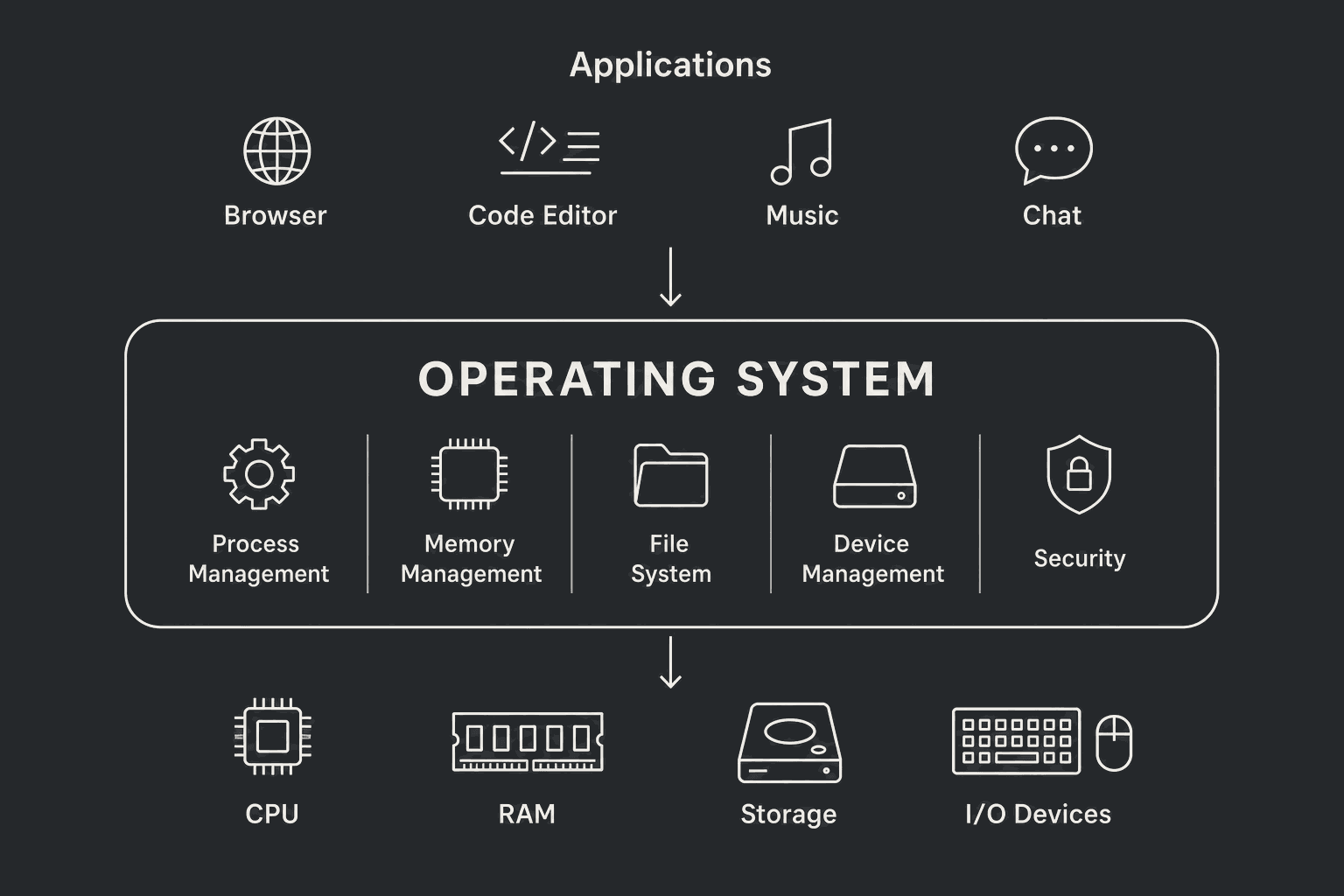
Main Functions of an Operating System
The OS provides the main services that applications need to work.
- Process Management: Starts, runs, and stops programs.
- Memory Management: Gives memory to applications and keeps their memory separate. Each process receives its own virtual memory space.
- File Management: Creates, reads, writes, deletes, and organizes files and folders.
- Device Management: Uses device drivers to communicate with hardware such as keyboards, printers, and storage devices.
- Security and Protection: Checks permissions and protects applications from each other.
- Resource Management: Shares the CPU, memory, storage, and devices between running applications.
Types of Operating Systems (High-Level)
Operating systems can be grouped in different ways. One Operating System may belong to more than one group.
You do not need to memorize every type. Understand the main idea behind each one.
- Batch OS: Runs a group of jobs without regular user interaction.
- Time-Sharing OS: Quickly shares CPU time between users or programs.
- Real-Time OS (RTOS): Completes important work within a fixed time. It is used in systems such as medical devices and aircraft controls.
- Distributed OS: Manages multiple connected computers as one system.
- Network OS: Provides services such as file and printer sharing over a network.
- Mobile OS: Designed for phones and tablets, such as Android and iOS.
Real-World Analogy
Think of a restaurant. The customer is the application, the waiter is the Operating System, and the kitchen is the hardware.
The customer asks the waiter for something. The waiter sends the request to the kitchen and returns the result.
In the same way, an application asks the OS for a service, and the OS works with the hardware to complete it.
An Important Trade-Off
The OS makes a computer safer and easier to use, but managing and checking every resource adds some extra work.
This small cost is necessary because it prevents applications from freely changing hardware, system files, or another application's memory.
What happens when you open Google Chrome
- 01You click the Chrome icon.
- 02The OS finds the Chrome program in storage.
- 03The OS creates a process for Chrome.
- 04The OS gives Chrome memory and loads the program.
- 05The CPU Scheduler gives Chrome a chance to run. More exactly, the CPU runs one of Chrome's threads.
- 06Chrome asks the OS to send and receive data through the network.
- 07The OS uses the network driver to communicate with the network hardware.
- 08Chrome receives the data and displays the webpage.
Example
Saving a file in VS Code
VS Code asks the Operating System to save the file. The OS checks permission, sends the request to the file and storage systems, and returns a result to VS Code. VS Code does not need to understand how the storage device works.
A common mistake
The Operating System is not only the desktop, icons, or settings screen. Its main work happens in the background while it manages resources, protects applications, and controls access to hardware.